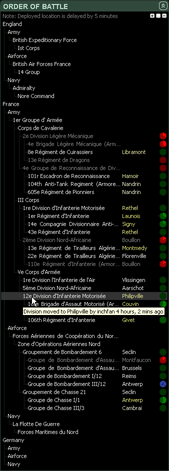
The Order of Battle window contains an expandable tree of each country’s military command structure for all branches down to the brigade level. You can navigate the tree using the arrow keys or expand/collapse nodes by clicking with the mouse. You can also use the Expand all, Expand top level only, or Collapse all buttons in the top right corner.
Each High Command unit is listed with the town in which they are deployed, highlighted yellow if they have been moved within the past 12 hours. Note that when a unit is moved in game their location in BEGM will be updated after a 5 minute delay. If you mouseover a brigade or division you can see when it was last moved and by which player. If a unit isn’t deployed (ie, has been routed) it will appear greyed out and is listed with its last-deployed town.
Each division/brigade has a redeployment timer on the right that is activated when a unit moves or is routed. It counts down (counter-clockwise) the time left until that unit can be moved or deployed from training. A blue clock icon means a unit has a pending move request that is waiting to be completed. Mouseover for more information.
You can right-click a brigade or division to get a menu that will allow you to jump to the unit’s Brigade Status section or their Equipment details.